
The Short Version: A checkbox is not evidence. A record is
Every product with a sign-up button has a clickwrap. Very few have one they could defend in a dispute, an enterprise security review or a regulator's request.
The usual setup is a checkbox, a link to the terms, and a boolean in a database. It works right up until someone asks the questions that matter: which version did they accept, what did the screen actually say, when, and from where? If the answer is "let me check with engineering", the click didn't hold up.
Courts have been consistent about what they look for. A user has to be given reasonably conspicuous notice of the terms, and has to take an action that clearly signals agreement. After the fact, you have to be able to show both. That's a design problem on the screen, and a data problem behind it.
Legal shouldn't have to reconstruct what a user agreed to. The system should already know.
- The old way: A boolean in a table — Terms live in code. Updates ship with a deploy. Nobody can say for sure which text a given user saw in March.
- The Chamelio way: Proof by default — Legal owns the agreement and its versions. Every acceptance is recorded against the exact version, with who, when and where.
What Courts Keep Asking: The law isn't mysterious. It's consistent
US courts sort online agreements along a spectrum. At one end, the user actively clicks "I agree" on the terms. At the other, the terms sit behind a link and the user is assumed to have agreed by carrying on.
Clickwrap is at the safe end. In Berman v. Freedom Financial Network, the Ninth Circuit noted that courts have routinely found clickwrap agreements enforceable. Browsewrap is where cases get lost. But the outcome never turns on the label alone. It turns on whether the design gave real notice and whether the user's action clearly meant "yes".
Note: Summaries are simplified for orientation and are not legal advice. Have counsel confirm how these apply to your product and jurisdiction.
Anatomy of a Click That Holds: Five things a defensible click has.
Take the courts' questions and turn them into a spec. Two are about the screen. Three are about the record.
- 01. Notice people can see — Terms are shown or clearly linked, in readable type, with links that look like links. Not gray on gray, not below the fold.
- 02. An action that means yes — A deliberate click on a checkbox or button, with wording that says what the click does: "By clicking Accept, you agree to..."
- 03. The exact words, frozen — The text a user accepted can never be edited afterwards. New wording means a new version, not an overwrite.
- 04. Who, when, from where — An identifier for the user, a timestamp, and technical context like IP address and browser, tied to that specific version.
- 05. Answers on demand — When legal, a customer's security team or a regulator asks "did this person accept this text?", someone can answer in minutes, from one place, without opening a ticket with engineering.
Items 1 and 2 are design. Items 3 to 5 are infrastructure. Most teams only ever build the first two.
Where Homegrown Clickwrap Breaks: It works fine. Until it doesn't.
None of these failures show up on launch day. They show up the first time someone asks for proof.
The checkbox was never the hard part. Keeping the record is.
How Chamelio Clickwrap Works: Legal writes it. Your app shows it. Chamelio remembers it.
- Publish a version (Legal): Publish, and that version is locked. The old one is archived automatically.
- Embed once (Developers): Drop in the SDK, keep your own design. Your app pulls the live version.
- They click (Your user): Chamelio records who, when, where from, and exactly which version.
- It goes to work (Chamelio): A PDF certificate lands in your repository, a webhook fires, workflows move on.
Behind the scenes, the SDK makes three calls: status (has this user accepted the current version?), get (fetch the active text, as click-to-accept or scroll-and-accept), and capture (record the acceptance against that exact version).
The Evidence Trail: Two questions decide enforceability. We answer both.
Every acceptance links a person to the exact locked text they saw. One event, one record, nothing to reconstruct.
- Who clicked: User ID, timestamp, IP address and browser, tied to one event. Optional metadata like session or product context rides along.
- What they saw: The exact version, frozen the moment it went live. Edits become a new version, and only one version is live at a time.
Change the terms without losing the past
Publish a new version and it becomes the active one. Your product can ask anyone who accepted an earlier version to accept again, with no code change. Prior acceptances stay attached to the wording people actually saw. The public key is built to live in browser code, works only from the web addresses you approve, and can be revoked at any time.
Where the Click Goes Next: Most clickwraps end at the click. Ours is where things start.
Clickwrap runs on its own. Run it alongside the rest of Chamelio and every acceptance becomes part of what your legal team already knows.
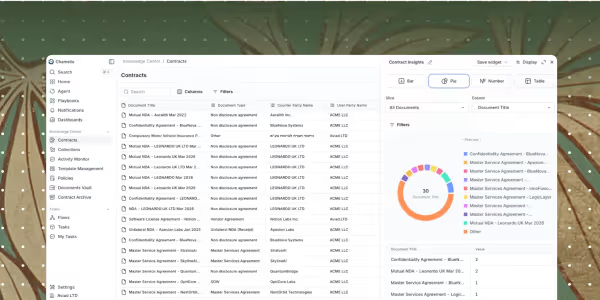
- 01. Repository: Certificates land next to your contracts, searchable like every other agreement.
- 02. Workflows: Request acceptance mid-Flow through the Sign step's Clickwrap tab, and pass the certificate to the next step.
- 03. Salesforce: Turn an acceptance into a contract record on the right account, with the PDF attached.
- 04. Webhooks + API: A
clickwrap.acceptedwebhook fires on every acceptance, so any other system can react. Server-side capture is available too.
Do you need the rest of Chamelio to use Clickwrap? No. But every acceptance ends up somewhere useful if you do.
Put It to Work: Your clickwrap stress test.
Ten questions. If you can't answer yes to all of them today, you've found your to-do list:
- Can a visitor clearly see that terms apply, in legible font, with hyperlinks that obviously look like links?
- Does the button or checkbox copy state explicitly that clicking constitutes legal agreement?
- Is the agreed-upon text stored in an immutable, read-only state?
- Can you identify the exact version of the terms any single user accepted?
- Do you record a verified timestamp, IP address, and browser context with every click?
- Can your legal team publish updated terms without waiting on an engineering sprint?
- Does your application automatically prompt the right users to re-accept when material terms change?
- Can legal search and retrieve proof of acceptance independently without logging a ticket?
- Are client-side API keys restricted to approved domains and revokable instantly?
- If an enterprise customer's security auditor asked for acceptance proof tomorrow, could you deliver it in under an hour?